Sunday, 5 December 2021

Fitness program: 5 steps to get started

Young woman running along sidewalk

Starting a fitness program may be one of the best things you can do for your health. Physical activity can reduce your risk of chronic disease, improve your balance and coordination, help you lose weight — and even improve your sleep habits and self-esteem. And there's more good news. You can start a fitness program in only five steps.

1. Assess your fitness level

You probably have some idea of how fit you are. But assessing and recording baseline fitness scores can give you benchmarks against which to measure your progress. To assess your aerobic and muscular fitness, flexibility, and body composition, consider recording:

  • Your pulse rate before and immediately after walking 1 mile (1.6 kilometers)
  • How long it takes to walk 1 mile, or how long it takes to run 1.5 miles (2.41 kilometers)
  • How many standard or modified pushups you can do at a time
  • How far you can reach forward while seated on the floor with your legs in front of you
  • Your waist circumference, just above your hipbones
  • Your body mass index

2. Design your fitness program

It's easy to say that you'll exercise every day. But you'll need a plan. As you design your fitness program, keep these points in mind:

  • Consider your fitness goals. Are you starting a fitness program to help lose weight? Or do you have another motivation, such as preparing for a marathon? Having clear goals can help you gauge your progress and stay motivated.
  • Create a balanced routine. For most healthy adults, the Department of Health and Human Services recommends getting at least 150 minutes of moderate aerobic activity or 75 minutes of vigorous aerobic activity a week, or a combination of moderate and vigorous activity. The guidelines suggest that you spread out this exercise during the course of a week. Greater amounts of exercise will provide even greater health benefits.

    But even small amounts of physical activity are helpful. Being active for short periods of time throughout the day can add up to provide health benefits.

    Do strength training exercises for all major muscle groups at least two times a week. Aim to do a single set of each exercise, using a weight or resistance level heavy enough to tire your muscles after about 12 to 15 repetitions.

  • Start low and progress slowly. If you're just beginning to exercise, start cautiously and progress slowly. If you have an injury or a medical condition, consult your doctor or an exercise therapist for help designing a fitness program that gradually improves your range of motion, strength and endurance.
  • Build activity into your daily routine. Finding time to exercise can be a challenge. To make it easier, schedule time to exercise as you would any other appointment. Plan to watch your favorite show while walking on the treadmill, read while riding a stationary bike, or take a break to go on a walk at work.
  • Plan to include different activities. Different activities (cross-training) can keep exercise boredom at bay. Cross-training using low-impact forms of activity, such as biking or water exercise, also reduces your chances of injuring or overusing one specific muscle or joint. Plan to alternate among activities that emphasize different parts of your body, such as walking, swimming and strength training.
  • Try high-interval intensity training. In high-interval intensity training, you perform short bursts of high-intensity activity separated by recovery periods of low-intensity activity.
  • Allow time for recovery. Many people start exercising with frenzied zeal — working out too long or too intensely — and give up when their muscles and joints become sore or injured. Plan time between sessions for your body to rest and recover.
  • Put it on paper. A written plan may encourage you to stay on track.

3. Assemble your equipment

You'll probably start with athletic shoes. Be sure to pick shoes designed for the activity you have in mind. For example, running shoes are lighter in weight than cross-training shoes, which are more supportive.

If you're planning to invest in exercise equipment, choose something that's practical, enjoyable and easy to use. You may want to try out certain types of equipment at a fitness center before investing in your own equipment.

You might consider using fitness apps for smart devices or other activity tracking devices, such as ones that can track your distance, track calories burned or monitor your heart rate.

4. Get started

Now you're ready for action. As you begin your fitness program, keep these tips in mind:

  • Start slowly and build up gradually. Give yourself plenty of time to warm up and cool down with easy walking or gentle stretching. Then speed up to a pace you can continue for five to 10 minutes without getting overly tired. As your stamina improves, gradually increase the amount of time you exercise. Work your way up to 30 to 60 minutes of exercise most days of the week.
  • Break things up if you have to. You don't have to do all your exercise at one time, so you can weave in activity throughout your day. Shorter but more-frequent sessions have aerobic benefits, too. Exercising in short sessions a few times a day may fit into your schedule better than a single 30-minute session. Any amount of activity is better than none at all.
  • Be creative. Maybe your workout routine includes various activities, such as walking, bicycling or rowing. But don't stop there. Take a weekend hike with your family or spend an evening ballroom dancing. Find activities you enjoy to add to your fitness routine.
  • Listen to your body. If you feel pain, shortness of breath, dizziness or nausea, take a break. You may be pushing yourself too hard.
  • Be flexible. If you're not feeling good, give yourself permission to take a day or two off.

5. Monitor your progress

Retake your personal fitness assessment six weeks after you start your program and then again every few months. You may notice that you need to increase the amount of time you exercise in order to continue improving. Or you may be pleasantly surprised to find that you're exercising just the right amount to meet your fitness goals.

If you lose motivation, set new goals or try a new activity. Exercising with a friend or taking a class at a fitness center may help, too.

Starting an exercise program is an important decision. But it doesn't have to be an overwhelming one. By planning carefully and pacing yourself, you can establish a healthy habit that lasts a lifetime.



Movie vs Movie novel, Which is Better ?

Watching Movies Vs Reading Books: What's The Right Pick? | Business Insider  India


In my opinion a novel is always better than movie as first of all it is an original idea, when you read a book it is like someone’s invention their imagination, their discovery, their feelings that they are sharing with you in hope that you will connect with it.


But at the same time they are giving you the freedom to perceive that idea, that feeling, that world in your own way. That helps us to build our own world in it.We can imagine how the hero might look, how the scenery described might look. Whereas in movies we don’t get that freedom as we are presented with a picture of everything.

While reading books you can create your own world based on the description provided by the writer, you have the right to think how the poverty must be, or how the rich would be living, we our self have freedom to think what the season would feel like how the                                                                                        neighbourhoods be, even if the writer has provided its description                                                                                    in the book.             

We get a creative freedom in reading.


Whereas when we watch a movie first of all we lose the right of creative freedom, also the movies are based on books and are not able to capture every feeling every emotion, provided in the pages of books. you feel what the actor is trying to portray you don’t get to feel what their inner mind is saying which we are able to do in books.Movies tend to lose the depth that books have. Why should Narnia look like how they have shown in movie, why should witch have that face, I want Narnia to be everything described in book and much more, I want the witch to look the way the writer has described but have a face that i imagine. But when i am presented with a picture then I lose my imagination and see the director’s imagination.


FlippED: Should You Read Books Or See Its Movie Adaptation, Our Bloggers  DebateWhat is the difference between reading a book and watching a movie? - Quora


In the past we have seen several wonderful adaptation of novel into movies like harry potter,lord of the rings,the help, TV shows like game of thrones or even the super hero movies based on comics. But still the love for these novels and comics shows us why people still want to read these and feel what they want to feel instead of someone showing them what they should feel, what they should imagine and what they should see. We always hear people saying that the movie was good as the book but in very rare scenario have we seen someone saying that the movie was way better than the book.

Books give you imagination whereas movies represent someone’s imagination of that book.


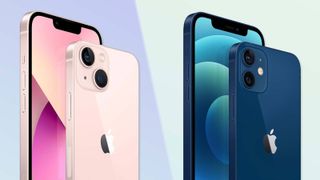
iPhone 12 or iPhone 13 !!!

Which iPhone should you buy?


iPhone 13 vs. iPhone 12


The new iPhone 13 is now firmly in place at the top of Apple's smartphone product line, and all four of the new models find themselves among the best phones you can buy. No matter what model you get — from the massive iPhone 13 Pro Max to the more affordable 6.1-inch iPhone 13 — you can expect a phone with terrific cameras, a best-in-class processor and a bevy of impressive features.


But the iPhone 13 has company in Apple's iPhone lineup. The iPhone 12 and w both remain on sale at reduced prices. Some shoppers may be tempted to get last year's phones if it means a lower cost.

For that reason, an iPhone 13 vs. iPhone 12 comparison can help you decide which iPhone to get if you're shopping for a new Apple device. Even if you're not, it can help to know how this year's iPhones differ from their predecessors. 

Having tested and used every new iPhone, we think that the iPhone 13 improves upon the iPhone 12 in almost every significant way, especially in terms of battery life and displays. Although it is worth noting that there have also been a few iPhone 13 problems reported. Still, teething issues aside, here's how the iPhone 13 builds on the iPhone 12 foundation.

iPhone 13 vs. iPhone 12: Specs

iPhone 13 miniiPhone 13iPhone 12 miniiPhone 12
Current price$699$799$599$699
Storage128GB, 256GB, 512GB128GB, 256GB, 512GB64GB, 128GB, 256GB64GB, 128GB, 256GB
Screen size5.4 inches6.1 inches5.4 inches6.1 inches
Resolution2340x10802532x11702340x10902532x1170
ProcessorA15A15A14A14
Rear cameras12MP main (Æ’/1.6); 12MP ultrawide (Æ’/2.4)12MP main (Æ’/1.6); 12MP ultrawide (Æ’/2.4)12MP main (Æ’/1.6), 16MP ultrawide (Æ’/2.4)12MP main (Æ’/1.6), 16MP ultrawide (Æ’/2.4)
Front camera12MP TrueDepth (Æ’/2.2)12MP TrueDepth (Æ’/2.2)12MP TrueDepth (Æ’/2.2)12MP TrueDepth (Æ’/2.2)
ColorsRed, Starlight, Midnight, Blue, PinkRed, Starlight, Midnight, Blue, PinkWhite, black, blue, green, purple, [Product] RedWhite, black, blue, green, purple, [Product] Red
Battery life (Hrs:Mins)8:4410:337:288:25
Size5.2 x 2.5 x 0.3 inches5.8 x 2.8 x 0.3 inches5.2 x 2.5 x 0.3 inches5.8 x 2.8 x 0.3 inches
Weight4.97 ounces6.14 ounces4.76 ounces5.78 ounces
Water resistanceIP68IP68IP68IP68

 iPhone 12 mini buyers as well.

iPhone 13 vs. iPhone 12: Design and display

From a design standpoint, there's not much difference between the iPhone 13 vs. the iPhone 12 — save for one very visible exception. That would be the notch on the iPhone 13, which is smaller on all four new models (20% smaller, in fact, according to Apple). Otherwise, the look of the phones is the same, with the same flat edges and Ceramic Shield displays for greater durability.

The new models do weigh a bit more — probably because of the bigger batteries Apple has included with the iPhone 13 — and there are new color options. A Pink model joins the black (Midnight), white (Starlight), blue and Product [RED] colors on the iPhone 13 and iPhone 13 mini. The new color for the iPhone 13 Pro lineup is Sierra Blue, which joins graphite, gold and silver options.

It's the displays where Apple has made the biggest changes from the iPhone 12, though the AMOLED panels used in the iPhone 13 lineup are the same size as their predecessors. Instead, Apple is promising brighter displays — 28% brighter than the iPhone 12's screens in fact. The iPhone 13 and 13 mini can produce 800 nits of brightness while the iPhone 13 Pro models crank things up to 1,000 nits.

In testing, we recorded 795 nits of brightness for the iPhone 13 and 788 nits for the iPhone 13 mini. That's better than both the iPhone 12 (569 nites) and iPhone 12 mini (505 nits). The iPhone 13 Pro (1,024 nits) and iPhone 13 Pro Max (1,038) nites) are terrifically bright, too.

The bigger display story comes with the iPhone 13 Pro and iPhone 13 Pro Max, which are the first Apple phones with ProMotion displays. That means they can dynamically adjust their refresh rate between 10Hz and 120Hz to reflect your onscreen activity. The iPhone 12 Pro models were stuck at 60Hz, the same as the iPhone 13, iPhone 13 mini, iPhone 12 and iPhone 12 mini.

iPhone 13 vs. iPhone 12: Cameras

Cameras turned out to be a big point of difference between the iPhone 13 and iPhone 12, even if the number of lenses are unchanged from phone to phone. It's what Apple has done with the camera hardware that makes the camera experience completely different on the iPhone 13.

Both the iPhone 13 and iPhone 13 mini offer a 12MP main camera that has the biggest sensor ever used in a dual-camera iPhone. It should let in 47% more light than the iPhone 12 camera for sharper pictures. These two iPhone 13 models sport the sensor shift optical image stabilization feature Apple added to the iPhone 12 Pro Max last year, and the ultrawide lens promises more detail in the darker areas of your images. The iPhone 13 Pro models feature even more dramatic camera changes. The main sensor is bigger on the iPhone 13 Pro and iPhone 13 Pro Max for better low light images, while the ultrawide angle lens has a wider f/1.8 aperture. (It was f/2.4 on the iPhone 12 Pro models.) Again, that's going to mean brighter, sharper images, even when the lights are low. And the 77mm telephoto lens on the iPhone 13 Pro models now offers a 3x optical zoom, an improvement over the 2.5x zoom found on the iPhone 12 Pro. Night Mode works on all three iPhone 13 Pro cameras, and the iPhone 13 Pro offers sensor shift stabilization, instead of limiting that feature to the Pro Max model.

 We haven't done a formal head-to-head camera face-off between any of the iPhone 13 and iPhone 12 models. But in some photo comps, you can see how the iPhone 13 handles low-light photography a little bit better than its predecessor. In this shot of hydrangeas, the leaves look pinker in the iPhone 13 shot, and there's brighter leaves surrounding the petals.

One other area worth highlighting is Cinematic mode, a video shooting feature available on all four iPhone 13 models. This mode automatically adjusts focus when you're shooting video, shifting between objects in the foreground and background as your filming warrants. You won't see a feature like this on the iPhone 12.

iPhone 13 vs. iPhone 12: Performance and 5G

The iPhone 13 models are all powered by the A15 Bionic processor, an upgrade from the A14 Bionic chip found in all the iPhone 12 models. Considering the A14 was the fastest system-on-chip we've tested, that translates to a pretty powerful performance for the new iPhones.

Having tested the iPhone 13 models, we found that the new chipset is faster than the A14 inside the iPhone 12, though there's not a dramatic iPhone 13 vs. iPhone 12 gap. In Geekbench 5, for example, the iPhone 13 Pro recorded single- and multicore scores of 1,733 and 4,718, respectively. Both of those results were better than the 1,585 and 3,669 results posted by the iPhone 12 Pro.

Those are synthetic benchmarks, though. In real world testing, the gap was more narrow. We use Adobe Premiere Rush to transcode a video, timing the results. The iPhone 13 models were faster at this than their iPhone 12 counterparts, but only by a second or two.

One thing about the iPhone 13 Pro models — they have a 5-core GPU, compared to a 4-core graphics processor on the regular iPhone 13. You'd think that would make the Pro models a gaming powerhouse, especially compared to last year's iPhones. Indeed, on 3DMark's Wildelife Unlimited test, the iPhone 13 Pro generated 70 frames per second to the iPhone 12 Pro's 51-fps result.

The iPhone 12 boasted some of the best 5G compatibility around, but Apple says the new phones should support even more 5G bands. By the end of the year, Apple says 5G support on the iPhone 13 models will double with more than 200 carriers in 60 countries and regions. 

The iPhone 13 ships with iOS 15 pre-installed. The iPhone 12 models debuted with iOS 14, but they're all eligible to download the iOS 15 update. (You can read what we think of those new features in our iOS 15 review.)

iPhone 13 vs. iPhone 12: Battery life and charging

Apple doesn't disclose battery sizes when it announces new phones, so we don't know how big the iPhone 13 batteries are relative to their iPhone 12 counterparts. But we do know that they are bigger and that they last much longer on a charge. That's welcome news. Apart from the iPhone 12 Pro Max, the other iPhone 12 models all finished well below average in our battery test in which we have phones surf the web over cellular until they run out of power.

Apple says that the iPhone 13 mini and iPhone 13 Pro should last up to 1.5 hours longer than their iPhone 12 counterparts. The iPhone 13 and iPhone 13 Pro Max are in line for 2.5 hour improvements. Our testing certainly bears that out.

iModeliBattery life (hours:mins)
iPhone 13 Pro Max12:16
iPhone 12 Pro Max10:53
iPhone 13 Pro11:42
iPhone 12 Pro9:06
iPhone 1310:33
iPhone 128:25
iPhone 13 mini8:41
iPhone 12 mini7:28

As you can see, each of the iPhone 13 models outlasted their iPhone 12 counterparts  in our battery test, with improvements ranging from modest in the case of the iPhone 13 mini to outstanding for both the iPhone 13 and iPhone 13 Pro Max. Both the iPhone 13 Pro models have earned a place on our best phone battery life list where we recognize phones that hold out for more than 11 hours on our test.

Charging speeds are unchanged from the iPhone 12 — 15W MagSafe wireless charging and 20W wired charging. As with the iPhone 12, the iPhone 13 models will ship without an included charger.

iPhone 13 vs. iPhone 12: Verdict

You expect phones to improve from one generation to the next, but the differences in our iPhone 13 vs. iPhone 12 comparison are quite stark. The better storage options, faster processor and camera improvements would be enough to make this a significant upgrade. Throw in improved battery life and — in the case of the iPhone 13 Pro models — fast-refreshing displays, and this is a big step up from last year.

The 8-Hour Rule

 " The timeless in you is aware of life's timelessness. And knows that yesterday is but today's memory and tomorrow is today...